The $300/Month Wake-Up Call
Last year I added up what I was paying for cloud services. Notion for notes. Otter.ai for transcription. Todoist for tasks. Bitwarden cloud for passwords. Google Photos for storage. A handful of automation tools. RSS readers. Monitoring dashboards.
Roughly $300 a month. For a single user. For tools that held my data on someone else’s servers, behind someone else’s terms of service, subject to someone else’s pricing.
I decided to build the alternative.
The Hardware
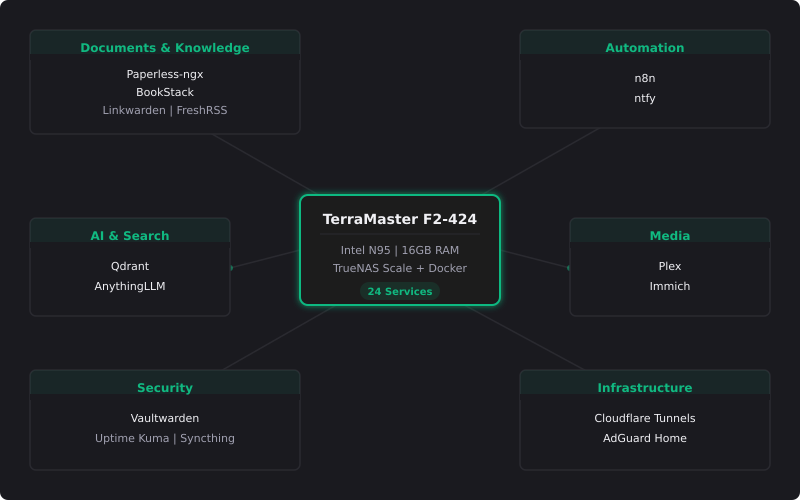
I didn’t buy a rack server. I didn’t build a custom PC. I bought a TerraMaster F2-424 — a compact 2-bay NAS with an Intel N95 processor and 16GB of RAM. Total cost: around $400.
This is a small box that sits on a shelf and draws about 15 watts idle. With TrueNAS Scale and Docker, it runs 24 services simultaneously and has for months without a hiccup.
Hardware Specs
Device: TerraMaster F2-424
CPU: Intel N95 (4 cores, up to 3.4GHz)
RAM: 16GB DDR5
Storage: 1x NVMe (apps) + 2x HDD (bulk storage)
Power draw: ~15W idle, ~35W under load
Monthly electricity: ~$3-4
The Stack
Everything runs as Docker containers managed through Docker Compose.
Document and knowledge
Paperless-ngx: OCR-powered document management. Every receipt, letter, and manual gets scanned, tagged, and made searchable.
BookStack: Self-hosted wiki for structured documentation. Runbooks, procedures, reference material.
Linkwarden: Bookmark manager with full-page archiving. Never lose a useful link again.
FreshRSS: RSS reader. Curated feeds instead of algorithmic noise.
Automation
n8n: Visual workflow automation. 80+ workflows handling everything from document processing to morning briefings.
ntfy: Push notifications. Every important event across the stack sends a notification.
AI and vector search
Qdrant: Vector database for semantic search. Embeddings generated on my Windows PC, stored and queried on the NAS.
AnythingLLM: RAG system. Upload documents, ask questions, get cited answers.
Media and photos
Plex: Media server for movies and TV.
Immich: Self-hosted Google Photos replacement with face detection and smart albums.
Security and infrastructure
Vaultwarden: Bitwarden-compatible password manager.
Uptime Kuma: Service monitoring with alerting.
Resilio: File sync between devices (Obsidian vault, shared folders).
Actual Budget: Privacy-first budgeting tool.
Plus a handful of supporting services: Cloudflare Tunnels for secure external access, AdGuard Home for DNS-level ad blocking, a homelab dashboard, and more.
What I learned
RAM Is the Real Bottleneck
With 16GB total, memory management matters. Immich alone can consume 3GB during photo processing. I learned to stagger heavy operations: run backups at night, limit concurrent transcription jobs and stop AnythingLLM when I'm not actively using it.
Docker compose is the best documentation
Every service is defined in a Docker Compose file. That file is the documentation. It captures every port mapping, volume mount, environment variable and dependency. When something breaks, I read the compose file, not a wiki article. When I want to rebuild, I run one command.
Automation compounds
The first n8n workflow I built saved me 5 minutes a day. The tenth saved me an hour. The thirtieth replaced an entire category of manual work.
Automation isn’t linear. Each workflow makes the next one easier because you’ve already solved the shared problems — LLM calls, notification routing and error handling.
Privacy is a feature, not a sacrifice
I self-host because I want to own what I rely on every day.
My documents aren’t training someone else’s AI model. My passwords aren’t in a breach notification. My photos aren’t being scraped for ad targeting. When a cloud service shuts down or changes pricing, I don’t lose anything.
The Cost Comparison
Monthly Costs: Cloud vs. Self-Hosted
Category              Cloud       Self-Hosted
Notes & Knowledge     $15/mo      $0
Transcription         $20/mo      $0
Password Manager      $5/mo       $0
Photo Storage         $10/mo      $0
Automation Tools      $50/mo      $0
AI APIs               $40/mo      $0
Misc SaaS             $50/mo      $0
Electricity           —           $4/mo
Total                 ~$200/mo    ~$4/mo
Hardware cost (~$400) pays for itself in 2 months.
Should You Do This?
If you’re a developer or IT professional, yes. The learning alone is worth it. You’ll understand Docker, networking, Linux administration, API design and system architecture at a level no tutorial can teach.
If you’re not technical, it’s still possible. TrueNAS, CasaOS and Umbrel make it easier. Start with one service — Paperless-ngx or Vaultwarden are good entry points — and grow from there.
The homelab is about owning what you rely on every day.