The Realization
Most SaaS products follow the same pattern: take data in, apply some rules, push data out. Email digest services read RSS feeds and send you a summary. Document processors OCR your files and tag them. Notification tools watch for events and ping you.
When I looked at the tools I was paying for (IFTTT, Zapier, various glue services), I realized they were all just workflow automation with a monthly invoice. n8n does the same thing, self-hosted, with no per-execution limits and no vendor lock-in.
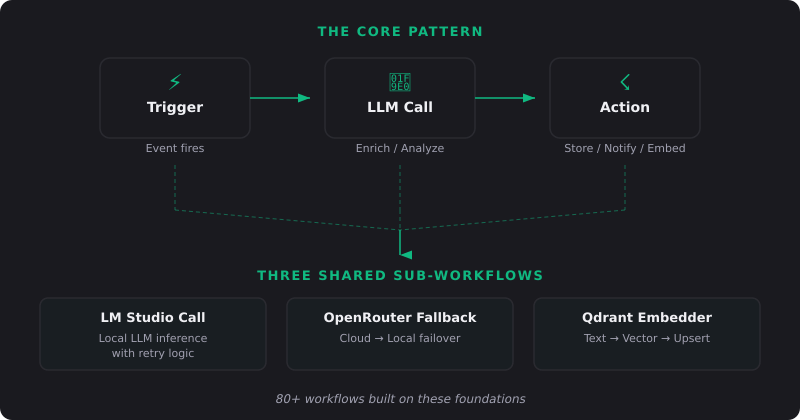
The Foundation: Three Shared Sub-Workflows
Before building 80 workflows, I built three reusable building blocks. Every complex workflow in my stack calls at least one of these:
Sub-Workflow 1: LM Studio Call
A webhook that accepts a system prompt and user message, formats them into an OpenAI-compatible request, sends it to my local LM Studio instance, parses the response, and returns clean text. Includes retry logic (3 attempts), timeout handling (120 seconds), and error formatting.
Used by: summarization, classification, title generation, content filtering, Q&A workflows.
Sub-Workflow 2: OpenRouter Fallback
Same as the LM Studio call, but tries a cloud LLM first (via OpenRouter's free tier). If the cloud call fails, it falls back to local inference. Cloud quality when available, local reliability as a backup.
Used by: complex analysis tasks, long-context processing, anything that benefits from a larger model.
Sub-Workflow 3: Qdrant Embedder
Takes any text, generates a vector embedding via nomic-embed-text, validates the result, and upserts it into a Qdrant collection with arbitrary metadata. This powers all my semantic search.
Used by: document indexing, note embedding, wiki syncing, knowledge base management.
Building these three sub-workflows first was the single best architectural decision. Every new workflow gets LLM capabilities and vector search for free. Just call the sub-workflow.
Workflow Categories
Document Processing (12 workflows)
These handle the lifecycle of every document that enters my system:
Auto-ingest: New files dropped into a consumption folder get OCR'd by Paperless-ngx, then an n8n workflow reads the content, asks the LLM to suggest tags and a document type, applies them, and generates an embedding for semantic search.
Receipt processor: Photographs of receipts get OCR'd, amounts/vendors/dates extracted by the LLM, and stored in a structured format.
Contract analyzer: Upload a contract, get a summary of key terms, dates, and obligations in under a minute.
Knowledge Management (15 workflows)
Note embedder: When a new Obsidian note is saved (detected via Syncthing webhook), it gets embedded in Qdrant automatically.
Weekly review digest: Every Sunday, an LLM reads my daily notes from the past week, extracts key themes and action items, and creates a summary note.
Bookmark enrichment: New Linkwarden bookmarks get summarized and tagged by the LLM.
Communication & Notifications (10 workflows)
Morning briefing: At 7am, RSS feeds get filtered through the LLM for relevance, weather is fetched, and a personalized briefing hits my phone via ntfy.
Service alerts: Uptime Kuma triggers a webhook on any service failure. n8n formats a detailed alert with the service name, error type, and last known status.
Smart notifications: Instead of raw alerts, every notification passes through the LLM for natural language formatting. "Paperless processed 3 new documents" instead of "webhook_event: docs_added, count: 3".
Content & Media (8 workflows)
RSS to summary: High-value RSS feeds get article content extracted, summarized by the LLM, and delivered as a daily digest email.
Voice memo pipeline: Audio files get transcribed by SolScribe, summarized, and saved as Obsidian notes with a link to the original recording.
3D model cross-posting: When I publish a new 3D print, a workflow generates AI descriptions and prepares listings for multiple platforms.
System Operations (15 workflows)
Backup verification: After scheduled backups run, a workflow checks file sizes, checksums, and freshness, then reports the result.
Health dashboard: Periodic checks across all 24 services, aggregated into a single status report.
Docker cleanup: Weekly pruning of unused images and volumes, with a notification of space recovered.
Certificate monitoring: Checks TLS certificate expiry dates and alerts 30 days before renewal is needed.
AI & Integration (20 workflows)
Chat session archiver: Important Claude conversations get scored for significance, summarized, and stored in Qdrant for future reference.
Knowledge graph updater: New content gets cross-referenced against existing knowledge to suggest connections.
Semantic deduplication: Before embedding new content, check if semantically similar content already exists.
Patterns That Scale
The Webhook → LLM → Action Pattern
90% of my workflows follow this shape: something triggers a webhook, the payload gets enriched or analyzed by an LLM call, and then an action is taken (store, notify, update, embed). Once you internalize this pattern, building new workflows takes minutes, not hours.
Error Handling That Doesn't Wake You Up
Every workflow has an error branch. If an LLM call fails, it retries. If the retry fails, it logs the error and sends a low-priority notification. Critical workflows (backups, security) get high-priority alerts. Non-critical ones (RSS summaries, bookmark enrichment) fail silently and retry on the next schedule.
Idempotency by Default
Workflows should be safe to re-run. Before embedding a document, check if it's already embedded. Before creating a note, check if one with that title exists. Before sending a notification, check if the same alert was sent in the last hour. This prevents duplicates during error recovery.
What I Stopped Paying For
Zapier ($49/mo) → n8n handles all integrations
IFTTT Pro ($5/mo) → n8n webhooks
Notion AI ($10/mo) → LM Studio + Obsidian
Readwise ($8/mo) → FreshRSS + n8n digest
Various monitoring tools ($15/mo) → Uptime Kuma + n8n alerts
Cloud transcription ($30/mo) → SolScribe + WhisperX
Total recovered: roughly $120/month in direct SaaS costs, plus capabilities these tools didn't even offer, like semantic search, local LLM processing, and unlimited workflow executions.
Advice for Getting Started
Start with one painful manual process. What do you do repeatedly that involves copying data between tools? That's your first workflow.
Build the sub-workflows first. If you use LLMs, build a reusable LLM call workflow before building anything that depends on it.
Don't over-automate. Some things are faster to do manually. Automate the things that happen daily, not the things that happen once a quarter.
Use webhooks everywhere. Every service in your stack probably supports webhooks. That's your integration layer, with no polling and no cron jobs checking for changes.
Document your workflows. Future you will not remember why that workflow has a 30-second delay before the second LLM call. Add notes.
n8n isn't just a Zapier replacement. It's It runs on your hardware, respects your data, and never charges you for exceeding a usage tier. That's hard to beat.